How to Remove Duplicates in Excel But Keep the Most Recent
To remove duplicates in Excel but keep the most recent row, sort your data newest to oldest by date first, then dedupe so the newest survives.
2026-08-16
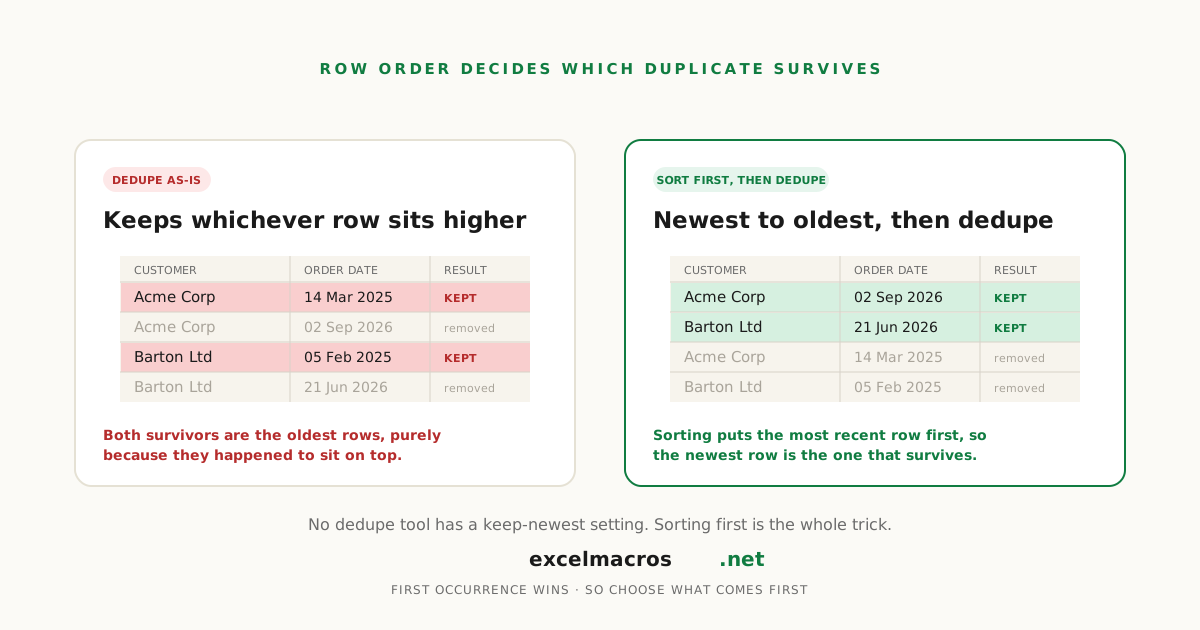
The problem with "just remove duplicates"
You have a customer list with the same account appearing three times, each row from a different order date. Run Excel's Remove Duplicates, or almost any dedupe macro including our own, and it keeps whichever row happens to come first in the sheet, not the newest one.
No dedupe tool has a "keep the newest" setting. Every one of them keeps the first row it encounters, in whatever order the data already sits in. The fix is a five-second step before you dedupe at all: put the row you want to survive first.
TL;DR: Key takeaways
- Excel's Remove Duplicates and every VBA dedupe macro keep the first occurrence in row order, not the newest by date.
- To keep the most recent, sort newest to oldest by date first, then dedupe. The newest row of each group lands first and survives.
- The same trick works in reverse, or with any priority column, not just dates.
- If your "Newest to Oldest" sort option is missing, your dates are stored as text.
Why "just remove duplicates" doesn't keep the newest
Microsoft's own documentation states it plainly: "When duplicates are removed, the first occurrence of the value in the list is kept, but other identical values are deleted." Row order decides the winner, not date or recency. Our own Remove Duplicates by Multiple Columns macro works the same way: it walks top to bottom and keeps whichever match it sees first.
The fix: sort newest to oldest, then dedupe
- Select your data including the header row.
- Data > Sort. Choose your date column, set Order to Newest to Oldest.
- The most recent row in every duplicate group now sits above its older copies.
- Run the macro (Alt + F8,
RemoveDuplicatesMultiColumn), selecting the columns that define a duplicate (name and email, not the date column). - Because you sorted first, "the earlier row" now means "the newer one."
Same result with Excel's built-in Data > Remove Duplicates. Want the oldest to survive instead? Sort Oldest to Newest, everything else is identical.
Why "Newest to Oldest" might not show up
Excel only offers that sort option when it's confident the column holds real dates. If dates arrived as text (common after a CSV import), the Order dropdown falls back to A to Z and Z to A, which sorts alphabetically, not chronologically. Run Standardize Dates to convert the column to real dates first, and the correct sort option appears.
This generalizes past dates
The mechanism is "put the winner on top, then dedupe." Keep the highest-value order instead: sort by an amount column, largest first. Keep your primary source over a secondary one: add a rank column, sort ascending. If two rows share the exact same date or amount, add a second sort key so ties resolve the way you intend.
A real example
An operations analyst appends a weekly CRM export to a running spreadsheet, so most customers now have three or four rows, one per week. Sorting the sheet Newest to Oldest by snapshot date, then running the macro on the customer-ID column, collapses it to one row per customer, and every survivor is guaranteed to be this week's data rather than whichever snapshot happened to land on top.
Frequently asked questions
How do I remove duplicates in Excel but keep the newest row?
Sort Newest to Oldest by your date column first, then run Remove Duplicates (built-in or the macro) on the columns that define a match, excluding the date column. Both tools keep whichever row comes first, and sorting puts the newest one there.
Does Excel have a built-in way to keep the most recent duplicate?
No. Remove Duplicates always keeps the first occurrence in the sheet's current row order. Sorting before you dedupe is the entire trick.
My Sort dialog only shows "A to Z," not "Newest to Oldest." Why?
Excel is treating your date column as text. Run Standardize Dates to convert it to real dates, and the correct sort option will appear.
Can I do this with a column other than a date?
Yes. Sort by whatever column should decide the winner, then dedupe on the columns that identify a duplicate group. The macro doesn't know or care what the sort key was.
What to do next
Not sure which rows count as duplicates yet? Run Highlight Duplicate Values first to see them without deleting anything. Then sort by the column that should decide the winner and run Remove Duplicates by Multiple Columns.