How to Number Only Visible Rows in Excel
To number only visible rows in Excel, skipping hidden and filtered rows, use =SUBTOTAL(103,$A$2:A2). Drag-fill and ROW() both number hidden rows too.
2026-08-17
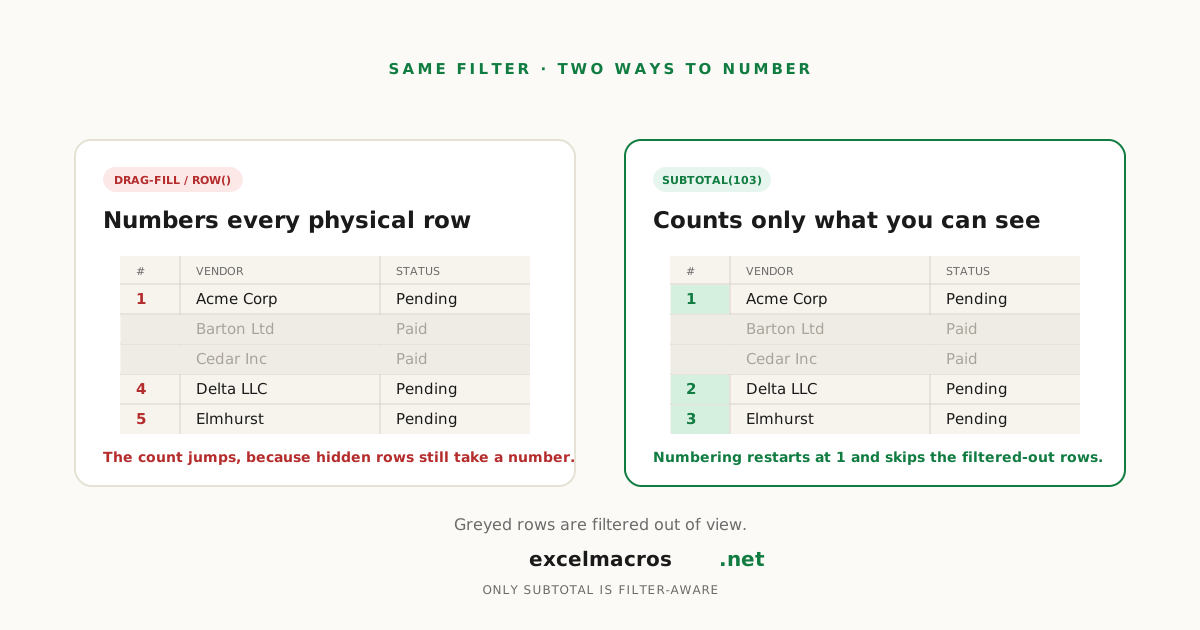
The "my numbers count rows I can't even see" problem
You filter a 500-row list down to 40 matches, add a numbering column, and expect 1 through 40. Instead you get 1, 4, 5, 12, 19..., the actual row positions from the unfiltered data.
Drag-fill, =ROW(), even =SEQUENCE() all number the physical row, not what's on screen. They assign a number to every cell based on position, with zero awareness of whether Excel is currently displaying it. There's exactly one built-in fix.
TL;DR: Key takeaways
- Drag-fill,
=ROW(), and=SEQUENCE()all number hidden and filtered rows the same as visible ones. None are filter-aware. =SUBTOTAL(103, $A$2:A2), filled down, counts only currently visible rows.SUBTOTAL(3, ...)still counts manually-hidden rows.SUBTOTAL(103, ...)skips those too. Filtered-out rows are excluded either way.- Our row-numbering macro fills every row in a selection, hidden or not, same as the manual methods. Right for a plain unfiltered list, not a filtered one.
The fix: SUBTOTAL, filled down
- Next to your first data row, enter
=SUBTOTAL(103, $B$2:B2), pointing at any column populated in every row. - Fill the formula down.
- Filter or hide rows however you like. The numbers recount what's visible, starting fresh from 1.
Microsoft's SUBTOTAL reference is specific: function codes 1 to 11 "include the values of rows hidden by the Hide Rows command," while 101 to 111 ignore those too. Either series always ignores filtered-out rows. So SUBTOTAL(103, ...), the hidden-aware version of COUNTA, skips both filtered rows and manually-hidden ones. Use plain SUBTOTAL(3, ...) if you want manually-hidden rows to still count, just not filtered ones, useful when you hide a few rows for a printout without wanting the numbering to shift.
Why the macro doesn't do this
Download Insert Row Numbers for a fast, static ID column on an unfiltered range.
- Select the column, Alt + F8, pick the macro, click Run.
- Type a starting number. Every cell gets the next integer in sequence.
It fills every cell regardless of hidden or filtered state, identical to drag-fill and =ROW(). Fine for a plain list; point it at a filtered view expecting gap-free numbers and you'll get physical-row-position numbers instead. If you need static numbers that respect a filter, filter first, copy just the visible rows to a new sheet, then run the macro on that copy.
A real example
An accounts payable clerk filters a 900-row vendor log down to "Pending Approval" rows for a Friday sign-off report, usually 25 to 60 of them, often after a first pass with Highlight Rows Containing Keyword to flag a specific vendor. Numbering with the fill handle produces exactly the mess you'd expect, the first visible row might read 14, the next 22. Switching that column to =SUBTOTAL(103, $C$2:C2) fixes it permanently: whatever the filter turns up, numbering restarts clean at 1 every week.
Frequently asked questions
How do I number only visible rows in Excel?
Use =SUBTOTAL(103, $A$2:A2) in the first data row, pointing at a column populated in every row, then fill down. It counts only currently visible rows, so hidden and filtered rows don't consume a number.
Why does =ROW() count hidden rows?
ROW() returns a cell's fixed position on the sheet. Hiding or filtering a row changes whether you can see it, not where it physically sits, so ROW() keeps counting it. Only visibility-aware functions like SUBTOTAL behave differently.
What's the difference between SUBTOTAL 3 and 103?
Both ignore filtered-out rows automatically. The difference is manually-hidden rows: plain 3 still counts them, 103 skips them too.
Does the free macro number only visible rows?
No. It fills every cell in the selection regardless of visibility, the same as dragging the fill handle. It's built for a static ID column on an unfiltered range, not filter-aware numbering.
What to do next
For a plain unfiltered range, Insert Row Numbers is faster than typing a formula. If the range gets filtered regularly, =SUBTOTAL(103, ...) keeps working without you thinking about it again. Numbering visible rows next to a running balance? Add Running Total Column pairs naturally with either method.